A food calculator can only be as clear as the numbers entered into it. Before dividing anything into blocks, work out what the label describes: the whole package, one serving, or a reference amount such as 100 grams. Then carry that same basis through every field.
This worksheet focuses on translating a label accurately. It does not decide how much you should eat, compare clinical diets, or turn a front-of-package claim into evidence about health. Keep the package beside you and use the Food Calculator as a checking tool rather than a replacement for reading it.
1. Find the serving basis before the nutrients
A U.S. Nutrition Facts serving is a labeling reference based on amounts typically consumed; it is not a recommendation for your personal portion. FDA explains that nutrient information is usually per serving, while some packages also show a whole-package column. Check both the serving weight and the number of servings in the container. Read FDA’s serving-size explanation.
Write three items on a scrap of paper: the column you are using, its serving weight in grams, and the weight you intend to measure. If the package uses milliliters without a gram weight, do not enter that volume as though it were mass. Use a food-specific conversion that is actually documented, or choose an appropriate data record.
2. Keep a small set of numbers together
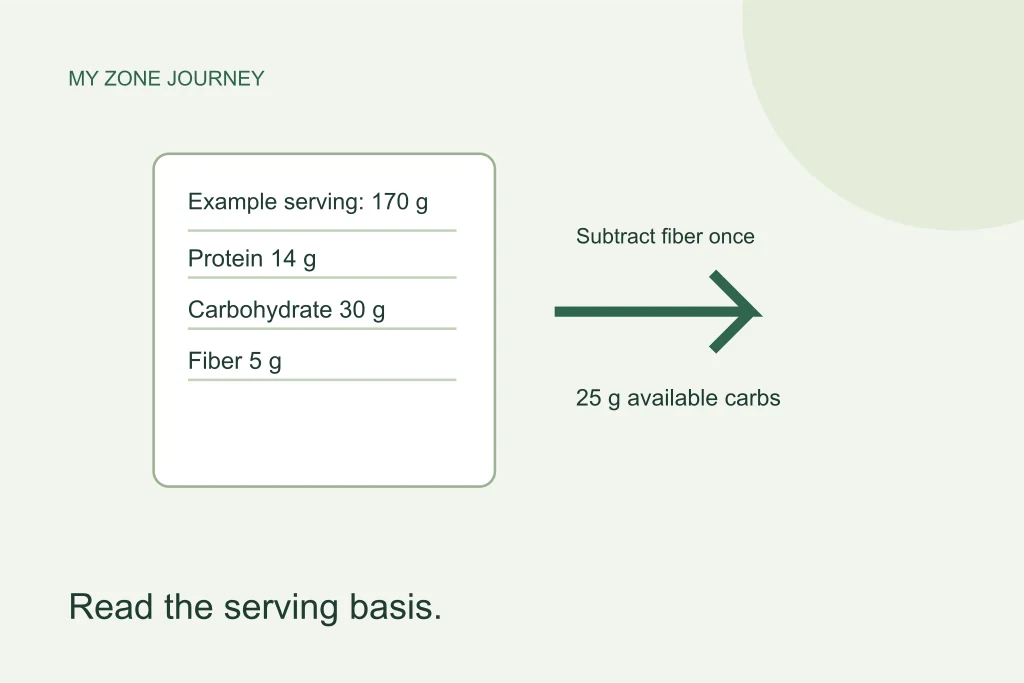
Imagine a hypothetical label with a 170-gram serving, 14 grams of protein, 30 grams of total carbohydrate, 5 grams of fiber, and 6 grams of fat. These are teaching numbers, not nutrition data for a named product. Their job is to show the process without suggesting that every yogurt, cereal, or snack has the same composition.
| Field | Recorded amount | What it describes |
|---|---|---|
| Serving size | 170 g | Weight of the entire serving |
| Protein | 14 g | Protein within that serving |
| Total carbohydrate | 30 g | Starting carbohydrate figure on this U.S. example |
| Dietary fiber | 5 g | Included in the example’s total carbohydrate |
| Total fat | 6 g | All fat in the serving |
The serving weight is not a nutrient amount. Entering 170 in both the serving and protein fields would describe something entirely different from this example. Likewise, the number 14 belongs in a protein calculation, not in the carbohydrate calculation simply because it appears prominently on the package.
3. Decide what the carbohydrate figure includes
FDA’s U.S. label guide places dietary fiber, sugars and sugar alcohols within total carbohydrate. For this site’s stated available-carbohydrate convention, the worked example uses 30 minus 5, giving 25 grams. The calculator does not discover or subtract fiber automatically when you type a manual nutrient value. See FDA’s carbohydrate guide.
Do not subtract total sugars or added sugars from that 25 grams. Those lines are not extra quantities to remove just because they appear below carbohydrate. Nor does this website automatically apply a separate sugar-alcohol deduction. A package advertising “net carbs” may be using assumptions that differ from the site’s simple total-minus-fiber convention. Keep the method visible instead of treating the marketing phrase as a universal definition.
4. Pause when the label comes from another jurisdiction
Do not assume every country defines or presents carbohydrate exactly like a U.S. Nutrition Facts panel. The European Commission describes declarations per 100 grams or 100 milliliters, with fiber available as additional information. Confirm the relevant definition before subtracting fiber; a separate fiber line alone does not prove that it was included in the carbohydrate figure. European Commission nutrition-label guidance.
If the definition remains unclear, record that uncertainty rather than confidently subtracting the same component twice. Check the manufacturer’s explanation and the responsible labeling authority. You can still compare like-for-like products using the same declared basis, but an uncertain conversion should not be presented as an exact block result.
5. Convert nutrients into clearly labeled equivalents
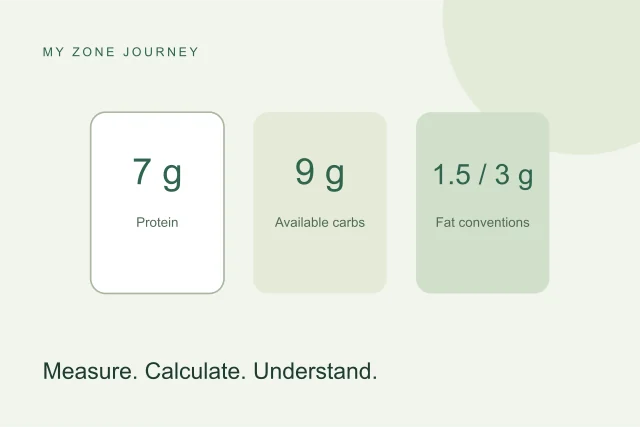
Using this site’s reference arithmetic, the full hypothetical serving contains 14 ÷ 7 = 2 protein equivalents and 25 ÷ 9 ≈ 2.78 available-carbohydrate equivalents. Its 6 grams of fat are 2 total-fat equivalents when divided by 3. Dividing by 1.5 instead produces 4 original added-fat equivalents. These are different labels, not competing answers to an identical question.
The original food tool preserves its added-fat calculation. A mixed-food reference shows total fat explicitly. Always read the result label before comparing a recipe with the original tool. Equal protein and carbohydrate counts would not, by themselves, tell you whether the fat convention has been matched.
6. Scale your actual portion once
If you weigh 85 grams of the hypothetical food, you have half of its stated 170-gram serving. Multiply every nutrient by 0.5: protein becomes 7 grams, available carbohydrate 12.5 grams, and total fat 3 grams. The corresponding reference counts are 1, about 1.39, and 1. Do not halve the nutrients and then also tell the calculator that the serving basis was already 85 grams; that would apply the adjustment twice.
For a different portion, use portion grams divided by label-serving grams as one common multiplier. This works for a 120-gram portion of a 170-gram reference just as it works for a neat half serving. Keep unrounded values during calculation, then round the displayed answer rather than rounding every intermediate step.
7. Audit the answer before saving it
- Does the result use the same product, preparation and serving basis as the label?
- Was fiber deducted only when appropriate, and only once?
- Are you comparing nutrient grams with nutrient grams, not food weight with nutrient weight?
- Is fat labeled as total-fat or original added-fat equivalents?
- Did the calculator’s own portion rounding change a small result?
Labels contain rounded declarations, while a food scale and database also have limits. A long decimal result cannot make the original inputs more precise. Save the product name and serving basis with your note so that a future package change is visible. For an unpackaged ingredient, use the sourced food reference and choose the correct raw or cooked record. A transparent calculation is more useful than an apparently perfect number whose starting point has been forgotten.